
When I built GuardianForge, I wanted sharing to feel polished by default. I wanted every shared build to include a custom image that showed the items used at a glance.
Text metadata is easy enough to configure, but generating dynamic images is a different problem, especially in a serverless environment. In this article, I’ll walk through how I generate Open Graph images on AWS using a Go-based Lambda function, triggered automatically when a build is created.
The end result is a fast, scalable system that produces a unique image for every build without blocking the main request path.
Architectural Overview
Before diving into image generation, it helps to understand what happens when a build is created in GuardianForge:
- The build payload is sent to API Gateway and handled by the main Lambda function.
- That Lambda stores a lightweight stub record in DynamoDB. This is used for fast rendering of build summary cards across the app.
- The full build JSON payload is stored in an S3 bucket.
- Finally, the build ID is sent to SQS for post-processing.
This separation is intentional. Image generation is relatively expensive compared to storing metadata, so it runs asynchronously and never slows down the main user flow.
How the image is created
The Open Graph image is generated using the github.com/fogleman/gg package. It’s a lightweight Go library for rendering 2D graphics and works well inside Lambda.
The image itself is composed in layers.
Base image
First, I create a new 500×500 pixel canvas with a dark gray background (#1e1f24).
This sets a neutral base that works well with item icons and keeps contrast consistent across builds.
Item icon grid
Next, the Lambda reads the build JSON from S3 and extracts the icon URLs for each item used in the build. These URLs are stored during build creation, so no extra lookups are required.
The icons are loaded into a slice, and their index is used to calculate placement in a 4×4 grid. Only the first 12 items are rendered to keep the image clean and readable.
Each icon’s (x, y) position is derived from:
- The grid column and row
- A fixed icon size
- Consistent padding between items
This approach keeps layout logic simple and predictable while still allowing for visually dense images.
Overlay layer
Once the icons are drawn, a final overlay is applied across the entire image. This adds subtle visual polish and helps unify the composition.
The overlay is just another image drawn on top using gg, but it makes a big difference in how “finished” the final result feels.
Final Output
Here’s what the finished Open Graph image looks like once all layers are combined. You can see the gray layer peeking through on the lowest row if icons (which have transparent backgrounds) and the overlay masking the icon images with rounded images.
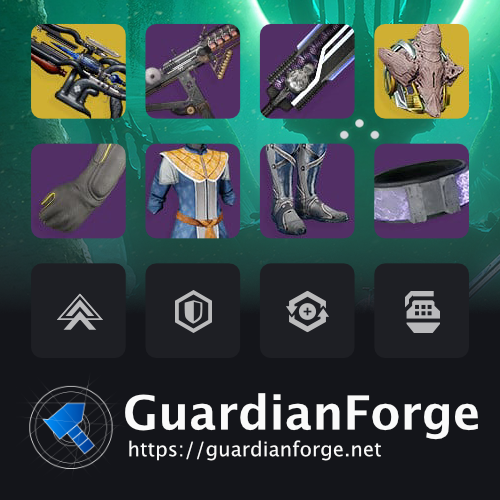
Once generated, the image is saved back to S3 alongside the original build data. From there, it can be served directly by CloudFront and referenced in the page’s Open Graph metadata.
This setup keeps image generation fully decoupled from the main request path, scales automatically with usage, and gives me complete control over how shared builds appear across social platforms. It’s a small detail, but it goes a long way in making GuardianForge feel intentional and polished.
Source code
Feel free to dive into the code to better understand how this while thing comes together:
package main

import (
	"bytes"
	"context"
	"encoding/json"
	"fmt"
	"image"
	"image/png"
	"log"
	"net/http"
	"strings"

	_ "embed"

	"github.com/aws/aws-lambda-go/events"
	"github.com/aws/aws-lambda-go/lambda"
	"github.com/aws/aws-sdk-go/aws"
	"github.com/aws/aws-sdk-go/aws/session"
	"github.com/aws/aws-sdk-go/service/s3/s3manager"
	"github.com/fogleman/gg"
	"github.com/pkg/errors"
	"guardianforge.net/core/models"
)

// This Lambda is triggered by S3 "ObjectCreated" events for build JSON files.
// For each new build JSON, it:
// - Downloads the JSON back from S3 over HTTPS
// - Decodes it into a `models.Build`
// - Renders a 500x500 PNG OpenGraph image containing a 4x3 grid of icons
// - Uploads the generated PNG back into the same bucket under `og/<buildId>.png`
//
// Note: most errors are wrapped with additional context via `errors.Wrap` so logs
// show where failures happened. Also note that some returned errors are
// intentionally ignored by the current callers (see `handler` and `CreateImage`).

//go:embed img/bg-wq.png
var bgbytes []byte

// The following stat icons are embedded into the binary at build time.
// We embed them so we do not depend on external network fetches for these assets
// (faster + more reliable inside Lambda).

//go:embed img/stats/dis.png
var disbytes []byte

//go:embed img/stats/int.png
var intbytes []byte

//go:embed img/stats/mob.png
var mobbytes []byte

//go:embed img/stats/rec.png
var recbytes []byte

//go:embed img/stats/res.png
var resbytes []byte

//go:embed img/stats/str.png
var strbytes []byte

func main() {
	// The AWS Lambda runtime will call `handler` for each incoming invocation.
	lambda.Start(handler)
}

func handler(ctx context.Context, s3Event events.S3Event) {
	// S3 can batch multiple object events into a single Lambda invocation.
	// We process each record independently.
	//
	// NOTE: `ctx` is currently unused. If you ever need cancellation/deadlines for
	// HTTP/S3 operations, you’d plumb `ctx` through and use `http.NewRequestWithContext`.
	for _, record := range s3Event.Records {
		s3 := record.S3
		log.Println(fmt.Sprintf("(handler) Handling build %v", s3.Object.Key))
		// NOTE: Errors are currently ignored (fire-and-forget behavior).
		// If you want retries / DLQ behavior, return an error from the handler.
		CreateImage(s3.Bucket.Name, s3.Object.Key)
		fmt.Printf("[%s - %s] Bucket = %s, Key = %s \n", record.EventSource, record.EventTime, s3.Bucket.Name, s3.Object.Key)
	}
}

func CreateImage(bucketName string, key string) error {
	// The S3 event provides only bucket + key. We fetch the object back over HTTPS.
	// Example:
	// https://guardianforge-qa-builds.s3.amazonaws.com/builds/<uuid>.json
	res, err := http.Get(fmt.Sprintf("https://%v.s3.amazonaws.com/%v", bucketName, key))
	if err != nil {
		return errors.Wrap(err, "(CreateImage) http.Get")
	}
	defer res.Body.Close()

	// Decode the build JSON so we can read `Highlights` and the equipped item icons.
	var build models.Build
	err = json.NewDecoder(res.Body).Decode(&build)
	if err != nil {
		return errors.Wrap(err, "(CreateImage) json.NewDecoder for json body")
	}

	// Create a 500x500 canvas.
	// We draw icon tiles first, then overlay the background/frame image last.
	// Drawing the background last lets it act like a "frame" or UI chrome.
	dc := gg.NewContext(500, 500)
	dc.SetHexColor("#1e1f24")
	dc.Clear()

	// Grid layout:
	// - 4 columns x 3 rows = 12 slots
	// - Each slot is a 96x96 icon
	// - `xPadding`/`yPadding` are the gaps between icons
	// - `xBase`/`yBase` is the top-left offset from the canvas origin
	xPadding := 18
	yPadding := 24
	xBase := 31
	yBase := 23

	// `row`/`col` are 1-indexed for easier “is first column?” math.
	row := 1
	col := 1
	// `count` tracks how many images we’ve actually drawn.
	count := 0
	// Used to avoid rendering the same image URL multiple times.
	// For example, highlights can overlap with item icons.
	imgUrls := map[string]bool{}
	for _, h := range build.Highlights {
		// The highlights are the primary “featured” icons.
		count++
		url, err := build.GetHighlightIconUrl(h)
		if err != nil {
			return errors.Wrap(err, "(CreateImage) build.GetHighlightIconUrl")
		}

		if url == "" {
			continue
		}

		// Track this URL so we don’t add it again later.
		imgUrls[url] = true

		// Convert (row,col) into (x,y) pixel coordinates.
		x := xBase
		y := yBase
		if col != 1 {
			x += ((96 + xPadding) * (col - 1))
		}

		if row != 1 {
			y += ((96 + yPadding) * (row - 1))
		}

		// Highlight images always come from a URL (as opposed to embedded stat icons).
		img, err := FetchImage(url)
		if err != nil {
			return errors.Wrap(err, "(CreateImage) FetchImage")
		}

		// Stat highlights are rendered centered in their tile.
		// Everything else is drawn top-left.
		if strings.Contains(h, "stat") {
			dc.DrawImageAnchored(img, x+48, y+48, 0.5, 0.5)
		} else {
			dc.DrawImage(img, x, y)
		}

		if col == 4 {
			col = 1
			row++
		} else {
			col++
		}
	}

	// If we didn’t fill all 12 slots with highlights, backfill using build items
	// (weapons/armor) and then the 6 character stats.
	//
	// `i < 20` is simply a safety bound to prevent an infinite loop if the
	// `count` logic or `GetUrlForItemIndex` mapping changes.
	for i := 0; count < 12 && i < 20; i++ {
		url, isStat := GetUrlForItemIndex(build, count)
		if url == "" || imgUrls[url] {
			continue
		}

		imgUrls[url] = true

		x := xBase
		y := yBase
		if col != 1 {
			x += ((96 + xPadding) * (col - 1))
		}

		if row != 1 {
			y += ((96 + yPadding) * (row - 1))
		}

		// For stats we generate the image from embedded assets.
		// For non-stats we download the icon from its URL.
		img, err := GenerateImageBlock(url, isStat)
		if err != nil {
			return errors.Wrap(err, "(CreateImage) GenerateImageBlock")
		}

		if isStat {
			dc.DrawImageAnchored(img, x+48, y+48, 0.5, 0.5)
		} else {
			dc.DrawImage(img, x, y)
		}

		if col == 4 {
			col = 1
			row++
		} else {
			col++
		}
		count++
	}

	// Decode the embedded background/frame and draw it last.
	fbg := bytes.NewReader(bgbytes)

	bg, err := png.Decode(fbg)
	if err != nil {
		return errors.Wrap(err, "(CreateImage) png.Decode background")
	}

	dc.DrawImage(bg, 0, 0)

	// Encode the final composited image into PNG bytes.
	b := bytes.Buffer{}
	err = png.Encode(&b, dc.Image())
	if err != nil {
		return errors.Wrap(err, "(CreateImage) png.Encode")
	}

	// The incoming S3 key is expected to look like: `builds/<buildId>.json`.
	// We derive the <buildId> to name the output object `og/<buildId>.png`.
	splitKey := strings.Split(key, "/")
	buildId := strings.ReplaceAll(splitKey[1], ".json", "")
	// NOTE: This assigns to `err` but does not currently return it.
	// The function always returns nil at the end, regardless of upload outcome.
	// This behavior is preserved intentionally (comment-only change).
	err = WriteImageToS3(bucketName, buildId, b)

	return nil
}

func WriteImageToS3(bucketName string, buildId string, imageBytesBuffer bytes.Buffer) error {
	// Upload destination for the generated OG image.
	ogImageKey := fmt.Sprintf("og/%v.png", buildId)

	// Create an AWS session using the Lambda execution role credentials and
	// environment configuration (region, etc.).
	sess, err := session.NewSession()
	if err != nil {
		return errors.Wrap(err, "(WriteImageToS3) create session")
	}

	// s3manager.Uploader expects an io.Reader for the body.
	reader := bytes.NewReader(imageBytesBuffer.Bytes())
	uploader := s3manager.NewUploader(sess)
	_, err = uploader.Upload(&s3manager.UploadInput{
		Bucket: &bucketName,
		Key:    &ogImageKey,
		Body:   reader,
		// Public-read makes the OG image directly fetchable by social crawlers.
		ACL:         aws.String("public-read"),
		ContentType: aws.String("image/png"),
	})
	if err != nil {
		return errors.Wrap(err, "(WriteImageToS3) create session")
	}
	return nil
}
func FetchImage(url string) (image.Image, error) {
	// Fetch and decode an arbitrary remote image.
	// `image.Decode` supports multiple formats (PNG/JPEG/GIF) based on content.
	res, err := http.Get(url)
	if err != nil {
		return nil, errors.Wrap(err, "(FetchImage) http.Get")
	}
	defer res.Body.Close()

	img, _, err := image.Decode(res.Body)
	if err != nil {
		return nil, errors.Wrap(err, "(FetchImage) image.Decode")
	}
	return img, nil
}

func GenerateImageBlock(url string, isStat bool) (image.Image, error) {
	// The calling code passes either:
	// - `isStat=false`: `url` is a real HTTP URL to an icon
	// - `isStat=true`: `url` is actually the stat name (e.g. "Mobility")
	//
	// For stats, we map stat-name -> embedded PNG bytes.
	if isStat {
		var imgReader *bytes.Reader
		switch url {
		case "Resilience":
			imgReader = bytes.NewReader(resbytes)
		case "Mobility":
			imgReader = bytes.NewReader(mobbytes)
		case "Recovery":
			imgReader = bytes.NewReader(recbytes)
		case "Discipline":
			imgReader = bytes.NewReader(disbytes)
		case "Intellect":
			imgReader = bytes.NewReader(intbytes)
		case "Strength":
			imgReader = bytes.NewReader(strbytes)
		}

		img, err := png.Decode(imgReader)
		if err != nil {
			return nil, errors.Wrap(err, "(GenerateImageBlock) png.Decode")
		}
		return img, nil
	} else {
		// Non-stat blocks are fetched by URL.
		return FetchImage(url)
	}
}

func GetUrlForItemIndex(build models.Build, index int) (string, bool) {
	// Maps a “slot index” to the next icon to show while backfilling the grid.
	// Return values:
	// - string: either an IconURL (items) or a stat name (stats)
	// - bool: true if the string is a stat name (so the caller uses embedded assets)
	//
	// The order is:
	// 0-2  : weapons (kinetic/energy/power)
	// 3-7  : armor (helmet/arms/chest/legs/class item)
	// 8-13 : character stats (Mob/Res/Rec/Dis/Int/Str)
	if index == 0 {
		// Kinetic
		return build.Items.Kinetic.IconURL, false
	}

	if index == 1 {
		// Energy
		return build.Items.Energy.IconURL, false
	}

	if index == 2 {
		// Power
		return build.Items.Power.IconURL, false
	}

	if index == 3 {
		// Helmet
		return build.Items.Helmet.IconURL, false
	}

	if index == 4 {
		// Arms
		return build.Items.Arms.IconURL, false
	}

	if index == 5 {
		// Chest
		return build.Items.Chest.IconURL, false
	}

	if index == 6 {
		// Legs
		return build.Items.Legs.IconURL, false
	}

	if index == 7 {
		// Class Item
		return build.Items.ClassItem.IconURL, false
	}

	if index == 8 {
		// Stat: Mobility
		return "Mobility", true
	}

	if index == 9 {
		// Stat: Resilience
		return "Resilience", true
	}

	if index == 10 {
		// Stat: Recovery
		return "Recovery", true
	}

	if index == 11 {
		// Stat: Discipline
		return "Discipline", true
	}

	if index == 12 {
		// Stat: Intellect
		return "Intellect", true
	}

	if index == 13 {
		// Stat: Strength
		return "Strength", true
	}

	// Out of range: no more icons to backfill with.
	return "", false
}